Node-ZKLib Cloud Alternative: Replace Local Scripts with a REST API
Hitting limits with node-zklib? Learn why developers switch to cloud REST APIs for ZKTeco device integration — with side-by-side code comparisons.
When Node-ZKLib Stops Working
You found node-zklib on GitHub. You wrote a script that connects to your ZKTeco device over TCP, pulls attendance logs, and syncs them to your database. It works on your dev machine.
Then production happens. The device IP changes. The connection drops silently. Firmware updates break the protocol parser. Your cron job dies at 3 AM and nobody notices until payroll runs.
Node-zklib is a good library for local development. It was never designed to run in production at scale.
The Five Problems Every Node-ZKLib User Hits
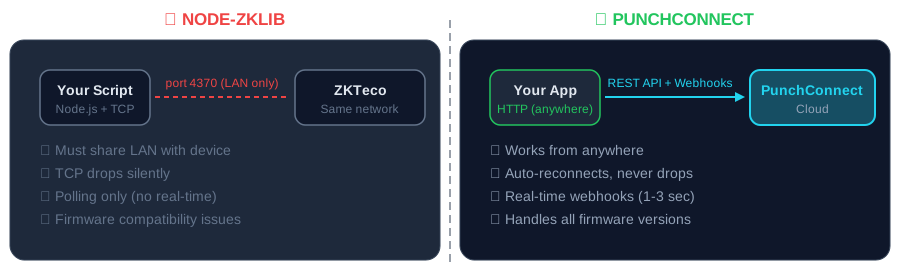
1. LAN-only. Your script must run on the same network as the device. Cloud-hosted apps (most apps in 2026) can't reach it without VPN tunnels or port forwarding.
2. Connection drops. TCP connections to ZKTeco devices are fragile. Network hiccups, device reboots, or firmware updates kill the connection with no retry mechanism.
3. Firmware incompatibility. ZKTeco has dozens of firmware versions. Node-zklib works with some, returns garbled data with others. The library has multiple forks — none are definitive.
4. No real-time events. Node-zklib only supports polling. You check for new records every X minutes. There's no way to get notified instantly when someone punches.
5. Single device per connection. Each device needs its own TCP socket. 50 devices = 50 connections to manage, monitor, and restart when they fail.
The Cloud Alternative: PunchConnect REST API
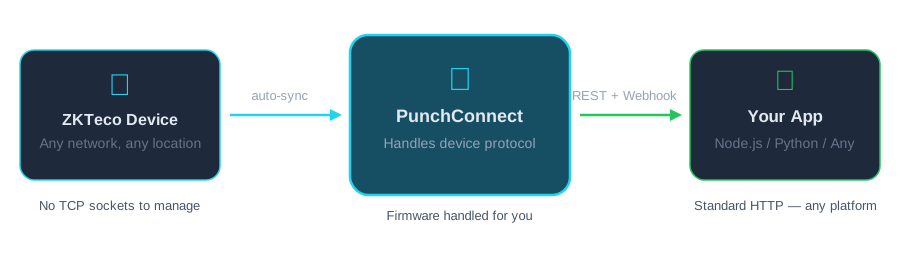
PunchConnect replaces the entire node-zklib stack with standard HTTP requests. The device connects to PunchConnect's cloud automatically. You call a REST API or receive webhooks.
No TCP sockets. Standard HTTPS requests from any language, any platform.
No LAN dependency. Works from cloud functions, serverless, or any internet-connected server.
Real-time webhooks. Get notified in 1-3 seconds when someone punches — no polling.
All devices, one API. 50 devices on different networks? One API endpoint handles them all.
Code Comparison: Node-ZKLib vs PunchConnect
Getting Attendance Records
Node-ZKLib (local TCP):
PunchConnect (cloud REST API):
const ZKLib = require("node-zklib");const zk = new ZKLib("192.168.1.201", 4370, 5000, 4000);// Must be on same LAN as deviceawait zk.createSocket();const attendance = await zk.getAttendances();await zk.disconnect();// Returns raw data, you parse it yourself
Real-Time Events
Node-ZKLib: Not supported. You poll with setInterval().
PunchConnect: Webhooks deliver events instantly:
app.post("/webhook", (req, res) => {const { employee_id, timestamp, punch_type } = req.body;console.log(`${punch_type}: ${employee_id} at ${timestamp}`);res.status(200).json({ received: true });});
When to Keep Node-ZKLib
Node-zklib still makes sense for:
- Local development/testing — quick access to a device on your desk
- Single-device, single-office setups with no cloud requirement
- Offline environments with no internet access
For everything else — cloud apps, multi-site deployments, real-time needs, production reliability — PunchConnect is the better path.
Migration Path
Switching takes about 30 minutes:
1. Sign up for PunchConnect (7-day free trial, no credit card)
2. Register your device and configure it through the dashboard (~5 min)
3. Replace your node-zklib TCP code with REST API calls
4. Set up a webhook endpoint for real-time events
5. Remove node-zklib, the cron job, and the VPN tunnel
Your existing employee ID mappings stay the same — PunchConnect uses the same device-side employee IDs.
Production Proof
PunchConnect powers attendance for 24,000+ active employees across 50+ sites. The same API that handles single-device startups handles enterprise deployments. Read the AgriWise case study →
Pricing
$200 per device — one-time. No monthly fees. Volume discounts from 10+ devices.
Compare that to the engineering time you spend maintaining node-zklib scripts, debugging TCP connections, and troubleshooting firmware issues. The API pays for itself in the first month.
Frequently Asked Questions
Can I replace node-zklib with a cloud API without changing my ZKTeco device? Yes. PunchConnect works with the same ZKTeco devices. No firmware update, no hardware change. You configure a few cloud settings on the device's admin panel and it connects automatically.
Does PunchConnect support the same ZKTeco models as node-zklib? Yes — and more. Node-zklib struggles with newer firmware. PunchConnect handles protocol differences automatically: SpeedFace, ProFace, uFace, iClock, K-series, MB-series.
Is node-zklib free while PunchConnect costs money? Node-zklib is free to download, but not free to run. Factor in developer time for connection management, firmware debugging, VPN setup, and monitoring. At $200/device, PunchConnect eliminates all of that.
How fast is the migration from node-zklib? About 30 minutes. Register your device, swap TCP code for REST calls, add a webhook endpoint. Your employee IDs stay the same.
Can I use PunchConnect from a serverless function? Yes. It's a standard REST API — works from AWS Lambda, Vercel, Cloudflare Workers, or any HTTP client. No persistent connections needed.
Start the Migration
Get your free 7-day trial — no credit card. Connect your first device in 5 minutes, receive your first webhook in seconds. Your node-zklib scripts will thank you for the retirement.
Articles connexes
Alternative CAMS Biométrique : API Callback et Webhooks pour le Pointage en Temps Réel
10 min read
ComparisonAlternative Cloud à Node-ZKLib : Remplacez vos Scripts Locaux par une API REST
4 min read
TutorialConnecter ZKTeco à Odoo : L'Approche API Cloud (Sans VPN, Sans Logiciel Local)
10 min read