API REST para Dispositivos Biométricos: Guía Completa para Desarrolladores
Conecta dispositivos biométricos ZKTeco a cualquier software mediante una API REST en la nube. Guía completa con autenticación, webhooks en tiempo real y código listo para producción en Python, JavaScript y cURL.
Introduction
Tu ERP está en la nube. Tus dispositivos biométricos están en la recepción de la oficina. Conectar ambos no debería requerir un título en redes.
Los SDK del fabricante exigen acceso a la red local, conocimientos de C++ y un sistema operativo específico. Los protocolos propietarios no están documentados y son frágiles. El polling de bases de datos introduce retrasos y dolores de cabeza de mantenimiento. Cada método tradicional asume que tu software corre en la misma LAN que el dispositivo. En 2026, eso casi nunca es así.
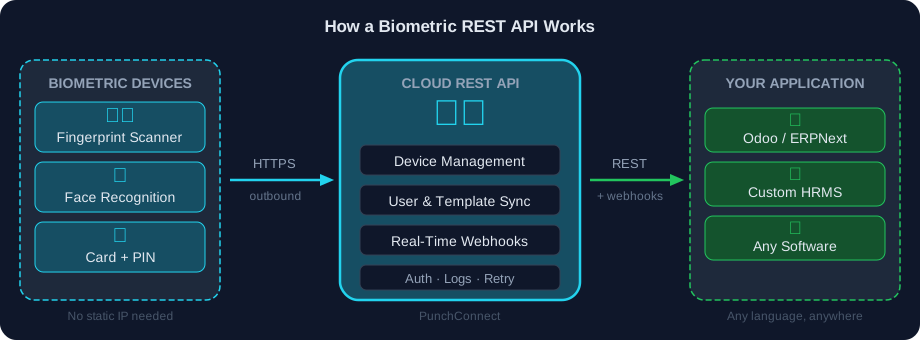
Una API REST biométrica resuelve esto. Es una capa de middleware en la nube entre tus dispositivos y tu aplicación, exponiendo endpoints HTTP estándar para gestión de dispositivos, enrolamiento de usuarios y datos de asistencia en tiempo real vía webhooks.
PunchConnect es exactamente eso — una API REST en la nube probada en producción que conecta dispositivos biométricos ZKTeco a cualquier sistema. Más de 24,000 empleados activos en más de 50 sitios la usan hoy. Esta guía te muestra cómo funcionan las API REST biométricas, cómo integrar una y cómo manejar autenticación, webhooks y recuperación de errores en producción.
Por qué las API REST superan a todos los demás métodos
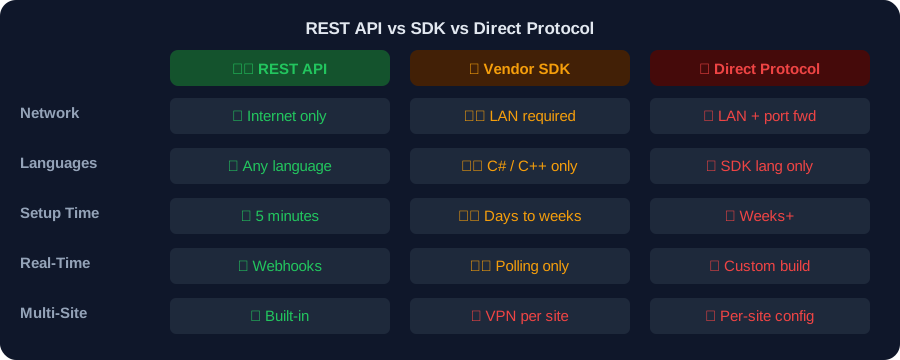
Si has investigado la integración de dispositivos biométricos, probablemente encontraste tres caminos: SDK del fabricante, acceso directo al protocolo y API REST. Aquí te explico por qué los equipos con experiencia eligen REST.
Los SDK te encierran. El SDK oficial de ZKTeco es una DLL de Windows en C#. Si tu backend es Python en Linux — o tu ERP está en la nube — estás atascado. Bibliotecas como node-zklib intentan hacer ingeniería inversa del protocolo, pero se rompen con cada actualización de firmware y no escalan.
Los protocolos directos necesitan LAN. Cada SDK y biblioteca de protocolo requiere el puerto TCP 4370 en la red local del dispositivo. Eso significa túneles VPN, IP fijas y reglas de firewall — por cada sitio. Un cambio de proveedor de internet rompe toda la configuración.
Las API REST simplemente funcionan. HTTPS estándar. Cualquier lenguaje. Sin instalación local. El dispositivo se conecta de salida (como un celular se conecta a Internet) y tu aplicación hace requests HTTP a un endpoint en la nube.
Lo que una buena API REST biométrica debe ofrecer
1. Gestión de dispositivos — Registrar, configurar, monitorear y dar de baja dispositivos remotamente
2. Enrolamiento de usuarios — Agregar usuarios con plantillas biométricas (huella, rostro, palma) sin presencia física
3. Asistencia en tiempo real — Webhooks entregan eventos de marcaje al instante, sin polling
4. Manejo de eventos — Acceso a puertas, alertas de seguridad, cambios de estado de dispositivos
5. Soporte multi-sitio — Gestionar dispositivos en más de 50 ubicaciones con una sola clave API
Endpoints principales: lo que realmente usarás
Una API REST biométrica bien diseñada se organiza alrededor de tres recursos: dispositivos, usuarios y registros de asistencia.
Gestión de dispositivos
# Registrar un nuevo dispositivoPOST /v1/devices{"serial_number": "AKJD193840129","name": "Entrada principal","location": "Edificio A, Piso 1"}# Verificar estado del dispositivoGET /v1/devices/AKJD193840129# → { "status": "online", "users": 243, "logs": 15847, "storage": "34%" }# Eliminar un dispositivoDELETE /v1/devices/AKJD193840129
Enrolamiento de usuarios
# Agregar usuario con huella digitalPOST /v1/users{"device_id": "AKJD193840129","user_id": "EMP_001","name": "Juan Pérez","templates": [{"type": "fingerprint","data": "BASE64_ENCODED_TEMPLATE","index": 0}]}
Registros de asistencia
Los eventos en tiempo real llegan por webhooks (detallados más abajo). El endpoint GET /logs es tu respaldo para eventos perdidos o consultas históricas.
# Consultar historial de marcajesGET /v1/logs?start_date=2026-03-01&end_date=2026-03-27&user_id=EMP_001
Código de producción: obtener registros de asistencia
cURL:
Python:
```python
import requests
API_KEY = "tu_clave_api"
BASE_URL = "https://api.punchconnect.com/v1"
response = requests.get(
f"{BASE_URL}/logs",
headers={"Authorization": f"Bearer {API_KEY}"},
params={
"start_date": "2026-03-01",
"end_date": "2026-03-27",
"user_id": "EMP_001"
}
)
for log in response.json()["data"]:
print(f"{log['user_id']} — {log['punch_type']} a las {log['timestamp']}")
```
JavaScript:
```javascript
const API_KEY = 'tu_clave_api';
const res = await fetch(
'https://api.punchconnect.com/v1/logs?start_date=2026-03-01&end_date=2026-03-27',
{ headers: { Authorization: Bearer ${API_KEY} } }
);
const { data } = await res.json();
data.forEach(log =>
console.log(${log.user_id} — ${log.punch_type} a las ${log.timestamp})
);
```
curl -X GET "https://api.punchconnect.com/v1/logs?start_date=2026-03-01&end_date=2026-03-27" \-H "Authorization: Bearer TU_CLAVE_API"
Autenticación: tres patrones que debes conocer
Los datos biométricos son sensibles. Una mala autenticación expone el control de dispositivos o datos de empleados. Estos son los tres patrones usados en producción.
1. Claves API — servidor a servidor (recomendado)
El método más simple. Incluye tu clave en cada header de request:
Ideal para: servicios backend, tareas cron, integraciones ERP. PunchConnect usa este patrón.
Reglas: almacenar en variables de entorno. Nunca commitear en git. Rotar cada trimestre. Usar claves separadas para dev, staging y producción.
Authorization: Bearer sk_live_abc123def456
2. OAuth 2.0 — aplicaciones de usuario
Acceso delegado con tokens de vida corta. Los usuarios autorizan tu app sin compartir credenciales.
Ideal para: productos SaaS donde los usuarios finales son dueños de los dispositivos.
3. Firmas HMAC — verificación de webhooks
Cuando la API envía webhooks a tu servidor, las firmas HMAC demuestran que la petición es legítima:
import hmac, hashlibdef verificar_webhook(payload: str, firma: str, secreto: str) -> bool:"""Verificar firma HMAC-SHA256 de un webhook entrante."""esperada = hmac.new(key=secreto.encode(),msg=payload.encode(),digestmod=hashlib.sha256).hexdigest()return hmac.compare_digest(esperada, firma)
Buenas prácticas de autenticación
- Siempre HTTPS — TLS 1.3 cifra las claves API en tránsito
- Rotar claves cada trimestre — o inmediatamente si se comprometen
- Solo variables de entorno — nunca hardcodeado en el código
- Claves separadas por entorno — dev, staging, producción
- Monitorear uso — detectar patrones inusuales (alto volumen, IPs inesperadas)
Webhooks en tiempo real: cómo fluyen los eventos de marcaje
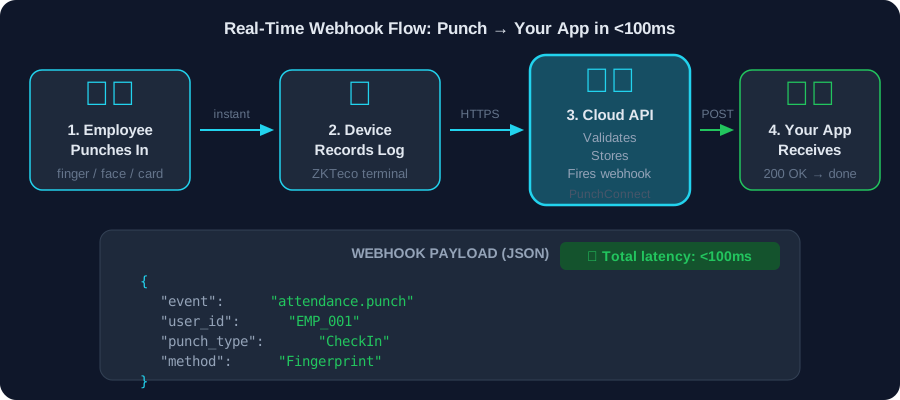
Los webhooks eliminan el polling. En el momento que un empleado marca, tu servidor lo sabe. Aquí está el flujo completo.
El flujo
1. El empleado escanea — dedo, rostro o tarjeta en el dispositivo biométrico
2. El dispositivo envía el evento — HTTPS de salida al gateway en la nube (automático)
3. La nube procesa — valida, almacena y envía un POST HTTP a tu URL de webhook
4. Tu servidor recibe el JSON — procesar, almacenar, responder 200 OK
Estructura del payload webhook
Campos esenciales:
- `event_id` — Almacenar para idempotencia (detección de duplicados)
- `punch.type` — CheckIn, CheckOut, BreakIn, BreakOut
- `punch.method` — Fingerprint, Face, Card, Palm, Password
- `timestamp` — Siempre en UTC; convertir a hora local para mostrar
{"event": "attendance.punch","event_id": "evt_1a2b3c4d5e","timestamp": "2026-03-27T08:30:12Z","device": {"id": "DEVICE_12345","name": "Entrada principal","location": "Edificio A"},"user": {"id": "EMP_001","name": "Juan Pérez"},"punch": {"type": "CheckIn","method": "Fingerprint","timestamp": "2026-03-27T08:30:12Z"}}
¿Qué pasa si tu servidor se cae?
PunchConnect reintenta webhooks fallidos con backoff exponencial durante hasta 24 horas. Cuando tu servidor vuelve, los eventos perdidos llegan automáticamente. El dashboard de logs de webhooks permite reenviar eventos específicos manualmente.
La idempotencia es crítica: si el reintento #2 tiene éxito pero PunchConnect no recibe tu 200 OK (corte de red), el reintento #3 envía el mismo evento. Usa event_id para detectar y saltar duplicados. Siempre.
Enrolamiento remoto: agregar empleados sin presencia física
El enrolamiento tradicional requiere que cada empleado vaya físicamente al dispositivo. Con una API REST, enrolas usuarios desde cualquier lugar.
Cómo funciona
1. Capturar la plantilla en una estación central de enrolamiento con un lector USB
2. Codificar en base64 — conversión binario-texto estándar
3. POST a la API — la nube envía la plantilla al dispositivo
4. El empleado queda enrolado — sin necesidad de trasladarse
Escala probada
Así es exactamente como AgriWise gestiona más de 24,000 empleados en sitios agrícolas distribuidos. El personal de RRHH enrola trabajadores en oficinas centrales y las plantillas se sincronizan con los dispositivos remotos en segundos. En cumplimiento con la legislación laboral local, los datos biométricos se cifran en tránsito (TLS 1.3) y en reposo.
Manejo de errores y límites de tasa
Las integraciones en producción necesitan recuperación de errores robusta.
Códigos HTTP que encontrarás
| Código | Significado | Acción |
|--------|------------|--------|
| 200 | Éxito | Procesar respuesta |
| 201 | Creado (usuario agregado, dispositivo registrado) | Almacenar nuevo ID |
| 400 | Petición inválida | Corregir payload, reintentar |
| 401 | Clave API inválida | Verificar clave, regenerar |
| 429 | Límite de tasa alcanzado | Esperar, reintentar con backoff |
| 500 | Error del servidor | Reintentar con backoff |
Operaciones por lotes para respetar los límites
La mayoría de las API REST imponen 100 peticiones/minuto por clave API. En vez de enrolar 50 usuarios uno por uno, usa endpoints batch:
Una sola petición en lugar de 50.
POST /v1/users/batch{"device_id": "DEVICE_12345","users": [{ "user_id": "EMP_001", "name": "Juan Pérez", "templates": [...] },{ "user_id": "EMP_002", "name": "María García", "templates": [...] }]}
FAQ
¿Necesito una IP fija para usar una API REST biométrica?
No. Las API REST en la nube eliminan la necesidad de IP fija. El dispositivo biométrico se conecta de salida al gateway en la nube por HTTPS estándar (puerto 443). Tu aplicación recibe datos por webhooks. Sin redirección de puertos, sin VPN, sin excepciones de firewall en el lado del dispositivo.
¿Puedo usar una API REST con cualquier marca de lector biométrico?
Depende del proveedor. PunchConnect soporta dispositivos ZKTeco y fabricantes compatibles — más de 200 modelos. Siempre verifica la compatibilidad antes de comprometerte. Para integración con Odoo o ERPNext, las API REST se integran sin VPN ni software local.
¿Cuál es la diferencia entre una API REST y un SDK para integración biométrica?
Los SDK son bibliotecas instaladas localmente que se comunican directamente con los dispositivos por red local. Son específicos de plataforma (DLLs de Windows, archivos .so de Linux) y requieren C++ o C#. Las API REST son endpoints HTTP en la nube que funcionan desde cualquier lenguaje, desde cualquier lugar, sin instalación local. Las API REST manejan la complejidad de red, proporcionan webhooks en tiempo real y son la única opción para sistemas ERP en la nube como Odoo Online.
¿Cómo aseguro mi endpoint de webhook?
Cinco prácticas: (1) Verificar firmas HMAC-SHA256 en cada petición. (2) Solo HTTPS. (3) Permitir solo las IPs del proveedor en tu firewall. (4) Limitar la tasa de tu endpoint. (5) Almacenar event_id para idempotencia.
¿Qué pasa si mi endpoint de webhook se cae?
PunchConnect reintenta webhooks fallidos durante hasta 24 horas con backoff exponencial. Cuando tu servidor se recupera, los eventos perdidos llegan automáticamente. Para caídas más largas, usa GET /v1/logs para recuperar datos. Siempre implementa verificaciones de idempotencia.
¿Cómo funciona el enrolamiento remoto de usuarios?
Captura plantillas biométricas en una estación central, codifica en base64 y envía por POST a la API. La nube envía las plantillas al dispositivo objetivo. Sin presencia física requerida. PunchConnect gestiona esto para más de 24,000 empleados en AgriWise.
Empieza a construir
Las API REST biométricas eliminan la complejidad de los SDK, los requisitos de IP fija y los retrasos del polling. Peticiones HTTP de entrada, webhooks en tiempo real de salida. Cualquier lenguaje, cualquier plataforma, cualquier ubicación.
Por qué los equipos eligen PunchConnect:
- Probado en producción — 24,000+ empleados en AgriWise en 50+ sitios
- Configuración en 5 minutos — Registra el dispositivo, obtén una clave API, recibe datos en tiempo real
- Latencia webhook <100ms — con reintento automático durante 24 horas
- Sin IP fija — los dispositivos se conectan de salida, cero configuración de red
- $200/dispositivo único, $50/año renovación — precios transparentes
Inicia tu prueba gratuita de 7 días → Sin tarjeta de crédito. Conecta tu primer dispositivo en menos de 5 minutos.
Artículos relacionados
Conectar ZKTeco a Odoo: Integración Cloud vía API REST (Sin VPN ni Software Local)
10 min read
GuideAsistencia Biométrica sin IP Fija: Solución Cloud para ZKTeco en LATAM
11 min read
ComparisonAlternativa a CAMS Biométrico con API Callback: Webhook en Tiempo Real para Control de Asistencia
10 min read