Integración Webhook ZKTeco: Pipelines de Asistencia en Tiempo Real con API REST
La integración webhook ZKTeco reemplaza el polling con eventos en tiempo real. Aprenda a configurar webhooks, verificar firmas HMAC y construir pipelines de asistencia fiables con la API REST de PunchConnect. Compatible con la Ley Federal del Trabajo de México y normativas LATAM.
Introduction
Todo desarrollador que ha construido una integración de asistencia con ZKTeco ha comenzado igual: escribir un cron job que se conecta al dispositivo cada 10 minutos, extrae los registros de asistencia y los sincroniza con la base de datos. Funciona en desarrollo. Se rompe en producción.
PunchConnect es un middleware cloud API REST que conecta dispositivos biométricos ZKTeco a cualquier sistema de software. En vez de que tu servidor haga polling a los dispositivos, PunchConnect entrega los eventos de asistencia a tu aplicación en tiempo real mediante webhooks — el mismo patrón event-driven usado por Stripe, GitHub y Twilio. Este artículo te guía a través de una integración webhook ZKTeco completa: desde registrar tu primer dispositivo hasta manejar eventos en producción con lógica de reintentos, verificación de firmas y enrutamiento multi-sitio.
Por qué el polling falla en producción
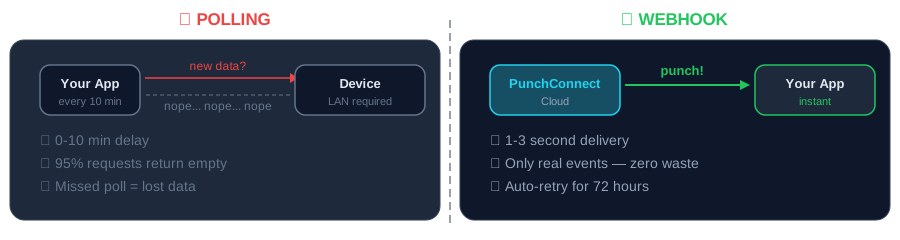
El modelo de polling tiene tres problemas fundamentales que ninguna ingeniería puede resolver.
Latencia. Un intervalo de polling de 10 minutos significa que los datos de asistencia llegan con 0 a 10 minutos de retraso. Para flujos sensibles al tiempo — cambios de turno, alertas de horas extra, control de acceso — ese retraso es inaceptable. Reducir el intervalo a 1 minuto genera 1,440 conexiones por dispositivo al día, la mayoría sin datos nuevos.
Dependencia de red. El polling requiere que tu servidor alcance el dispositivo en una IP conocida. Eso implica IPs estáticas, port forwarding o túneles VPN en cada sede. Para organizaciones con ERPs en la nube como Odoo Online o ERPNext, esto es inviable. Si ya enfrentaste este problema, la guía sobre asistencia biométrica sin IP fija explica el cambio arquitectónico en detalle.
Fragilidad a escala. Gestionar conexiones de polling a 50 dispositivos en 12 sucursales significa 50 puntos potenciales de fallo. Una interrupción del ISP, un reinicio de router, un cambio en las reglas del firewall — y pierdes datos de asistencia sin notificación.
Cómo funcionan los webhooks
Los webhooks invierten la dirección de la conexión. En vez de que tu aplicación pregunte "¿hay nuevos registros?" cada pocos minutos, PunchConnect le avisa a tu aplicación en el instante en que ocurre un registro.
El flujo es directo:
1. Un empleado escanea su huella o rostro en un dispositivo ZKTeco.
2. El dispositivo envía el evento a la nube de PunchConnect. Configuras esto una vez en el dashboard — sin necesidad de conocer el protocolo, sin SDK que instalar.
3. PunchConnect normaliza los datos crudos del dispositivo en un payload JSON limpio y envía un HTTP POST a tu URL de webhook.
4. Tu aplicación procesa el evento y responde con un 200 OK.
Esta arquitectura significa que tu aplicación solo necesita exponer un único endpoint HTTPS. Sin reglas de firewall entrantes en las redes de los dispositivos. Sin IPs estáticas. Sin infraestructura de polling.
Tipos de eventos soportados
- attendance.created — un nuevo evento de entrada o salida
- device.online — un dispositivo se ha conectado a la nube
- device.offline — un dispositivo ha dejado de enviar heartbeats
- employee.enrolled — una nueva huella o plantilla facial fue registrada en el dispositivo
Te suscribes solo a los eventos que necesitas. La mayoría de las integraciones comienzan con attendance.created y agregan monitoreo de dispositivos después.
Prerrequisitos
Necesitas una cuenta PunchConnect (la prueba gratuita de 7 días sirve para este tutorial), al menos un dispositivo ZKTeco registrado en tu dashboard, y un endpoint HTTPS que pueda recibir peticiones POST. Para desarrollo local, herramientas como ngrok te dan una URL pública que conecta con tu servidor local.
Paso 1: Registrar tu webhook
Usa la API de PunchConnect para crear una suscripción de webhook:
curl -X POST https://api.punchconnect.com/api/v2/zk/webhooks \-H "X-CLIENT-ID: tu_client_id" \-H "X-CLIENT-SECRET: tu_client_secret" \-H "Content-Type: application/json" \-d '{"url": "https://tu-servidor.com/webhooks/asistencia","events": ["attendance.created", "device.online", "device.offline"],"secret": "tu_secreto_webhook"}'
Paso 2: Construir tu receptor de webhooks
Python (Flask)
import hmacimport hashlibfrom flask import Flask, request, jsonifyapp = Flask(__name__)WEBHOOK_SECRET = "tu_secreto_webhook"def verificar_firma(payload, firma):esperada = hmac.new(WEBHOOK_SECRET.encode(),payload,hashlib.sha256).hexdigest()return hmac.compare_digest(esperada, firma)@app.route("/webhooks/asistencia", methods=["POST"])def recibir_webhook():firma = request.headers.get("X-Signature", "")if not verificar_firma(request.data, firma):return jsonify({"error": "Firma inválida"}), 401evento = request.jsontipo = evento.get("event")event_id = evento.get("event_id")# Idempotencia: verificar si ya procesamos este eventoif evento_ya_procesado(event_id):return jsonify({"status": "ya_procesado"}), 200if tipo == "attendance.created":empleado = evento["data"]["employee_name"]hora = evento["data"]["timestamp"]tipo_registro = evento["data"]["punch_type"]print(f"{empleado} - {tipo_registro} a las {hora}")# Insertar en base de datos, disparar workflow, etc.elif tipo == "device.offline":dispositivo = evento["data"]["device_serial"]print(f"⚠️ Dispositivo {dispositivo} desconectado")# Enviar alerta al equipo de TImarcar_como_procesado(event_id)return jsonify({"status": "recibido"}), 200
JavaScript (Express.js)
const express = require('express');const crypto = require('crypto');const app = express();app.use(express.json());const WEBHOOK_SECRET = process.env.WEBHOOK_SECRET;function verificarFirma(payload, firma) {const esperada = crypto.createHmac('sha256', WEBHOOK_SECRET).update(JSON.stringify(payload)).digest('hex');return crypto.timingSafeEqual(Buffer.from(esperada), Buffer.from(firma));}app.post('/webhooks/asistencia', async (req, res) => {const firma = req.headers['x-signature'];if (!verificarFirma(req.body, firma)) {return res.status(401).json({ error: 'Firma inválida' });}const evento = req.body;const { event: tipo, event_id } = evento;// Idempotenciaconst existe = await db.query('SELECT 1 FROM eventos_procesados WHERE event_id = ?',[event_id]);if (existe.length > 0) {return res.status(200).json({ status: 'ya_procesado' });}if (tipo === 'attendance.created') {const { employee_name, timestamp, punch_type } = evento.data;await db.query('INSERT INTO asistencia (empleado, tipo, hora, dispositivo_id) VALUES (?, ?, ?, ?)',[employee_name, punch_type, timestamp, evento.data.device_serial]);}await db.query('INSERT INTO eventos_procesados (event_id) VALUES (?)', [event_id]);res.status(200).json({ status: 'recibido' });});app.listen(3000, () => console.log('Servidor webhook activo en puerto 3000'));
Paso 3: Probar tu webhook
Esto envía un evento sintético attendance.created con datos de prueba. Tu receptor debería registrar el evento y devolver 200 OK. Revisa los logs de entrega de webhooks en tu dashboard de PunchConnect para confirmar la entrega exitosa.
curl -X POST https://api.punchconnect.com/api/v2/zk/webhooks/test \-H "X-CLIENT-ID: tu_client_id" \-H "X-CLIENT-SECRET: tu_client_secret"
Patrones de producción
Idempotencia
Los problemas de red pueden causar que PunchConnect reintente una entrega de webhook. Cada evento incluye un campo único event_id. Almacena los IDs procesados y omite duplicados:
eventos_procesados = set() # En producción, usa Redis o tu base de datosdef evento_ya_procesado(event_id):return event_id in eventos_procesadosdef marcar_como_procesado(event_id):eventos_procesados.add(event_id)
Reintentos automáticos
PunchConnect reintenta entregas fallidas (respuestas no-2xx) con backoff exponencial: 1 minuto, 5 minutos, 30 minutos, 2 horas, 24 horas. Después de 5 intentos fallidos, el webhook se marca como fallando y recibes una alerta por email. Tu endpoint debe responder en menos de 10 segundos — descarga el procesamiento pesado a una cola en segundo plano.
Enrutamiento multi-sitio
Para organizaciones con dispositivos en múltiples sedes, usa los campos device_serial y location opcionales para enrutar eventos al pipeline correcto:
RUTAS_POR_SEDE = {"SEDE_CDMX": procesar_ciudad_mexico,"SEDE_GDL": procesar_guadalajara,"SEDE_MTY": procesar_monterrey,}def enrutar_evento(evento):sede = evento["data"].get("location", "default")handler = RUTAS_POR_SEDE.get(sede, procesar_default)handler(evento)
Monitoreo de dispositivos
Suscríbete a eventos device.online y device.offline para monitorear tu flota. Un dispositivo que se desconecta durante horario laboral probablemente tiene un problema de conectividad — y quieres saberlo antes de que los empleados reporten registros perdidos.
Polling vs Webhooks: comparación práctica
| Aspecto | Polling | Webhooks |
|---------|---------|----------|
| Latencia | 5-30 min (intervalo fijo) | <2 segundos |
| Infraestructura | IP estática + VPN + servidor 24/7 | Un endpoint HTTPS |
| Detección de fallos | En el siguiente ciclo de sync | Inmediata (evento device.offline) |
| Esfuerzo de desarrollo | Manejar protocolos + conexiones + parsing | Un endpoint HTTP + parser JSON |
| Costo a escala (50 dispositivos) | 14,400 conexiones/día | Solo eventos reales (~2,500/día) |
Cumplimiento normativo en LATAM
Las organizaciones en América Latina deben considerar marcos regulatorios al implementar sistemas de asistencia biométrica:
México — Ley Federal del Trabajo
- El Artículo 804 requiere que los patrones conserven registros de asistencia de los trabajadores
- La NOM-035-STPS exige documentación del entorno organizacional, incluyendo control de jornada
- Los webhooks de PunchConnect proporcionan registros auditables con marca de tiempo UTC
Colombia — Código Sustantivo del Trabajo
- Los empleadores deben llevar registro de horas trabajadas y extras
- La Ley 1581 de 2012 (habeas data) regula el tratamiento de datos biométricos
- Los datos deben almacenarse en servidores con niveles adecuados de protección
Argentina — Ley de Contrato de Trabajo
- El artículo 6° de la Ley 11.544 establece la obligación de control horario
- La Ley 25.326 de Protección de Datos Personales clasifica los datos biométricos como sensibles
Ventaja de los webhooks para cumplimiento: cada evento incluye marca de tiempo UTC, ID del dispositivo y método de verificación — exactamente lo que necesitas para auditorías regulatorias.
Integración con ERPs
El poder real de la integración webhook ZKTeco es lo que ocurre después de que llega el evento. PunchConnect funciona con cualquier stack que maneje peticiones HTTP POST: Django, Laravel, Spring Boot, Go, Ruby on Rails, o funciones serverless en AWS Lambda o Cloudflare Workers.
- Para Odoo, consulta la guía completa de conexión ZKTeco a Odoo
- Para ERPNext, el artículo sobre asistencia biométrica para ERPNext cubre la configuración completa incluyendo el receptor de webhooks de Frappe HR
FAQ
¿Cuánto tarda en llegar un evento webhook?
PunchConnect entrega eventos webhook en 1 a 3 segundos desde que el empleado escanea en el dispositivo. Compara esto con intervalos de polling de 5 a 30 minutos en enfoques tradicionales.
¿Necesito una IP estática?
No. Tu dispositivo ZKTeco se conecta de forma saliente a la nube de PunchConnect, y PunchConnect envía webhooks a la URL de tu aplicación. Ningún lado requiere IP estática, port forwarding ni VPN. Consulta la guía completa sobre asistencia biométrica sin IP fija.
¿Puedo usar un solo endpoint para múltiples dispositivos?
Sí. Cuando creas una suscripción webhook sin especificar device_serial, PunchConnect envía eventos de todos los dispositivos de tu cuenta a ese endpoint. Cada payload incluye el campo device_serial para que tu aplicación enrute los eventos por dispositivo.
¿Qué pasa si mi servidor está caído?
PunchConnect reintenta entregas fallidas con backoff exponencial durante 24 horas (5 reintentos). Los eventos se encolan durante la caída y se entregan cuando tu endpoint vuelve a estar disponible. No se pierde ningún dato de asistencia. También puedes usar la API REST para obtener eventos perdidos manualmente.
¿Funciona con ERPs en la nube?
Sí. Los webhooks son peticiones HTTP POST estándar a una URL, por lo que funcionan con cualquier sistema que pueda exponer un endpoint HTTPS — incluyendo Odoo.sh, Odoo Online, ERPNext en Frappe Cloud, y cualquier plataforma SaaS con API.
Conclusión
Configurar una integración webhook ZKTeco con PunchConnect toma unos 15 minutos: registra tu dispositivo, crea un endpoint webhook y comienza a recibir eventos de asistencia en tiempo real. Sin SDK que instalar, sin documentación de protocolos que descifrar, sin IPs estáticas que configurar.
Comienza con la prueba gratuita de 7 días — conecta un dispositivo y prueba el flujo de webhooks de principio a fin. Cuando estés listo para escalar, la licencia de $200/dispositivo incluye entregas ilimitadas de webhooks, todos los tipos de eventos y la API REST completa para gestión de dispositivos, sincronización de empleados y consultas de asistencia.
Si necesitas ayuda diseñando tu arquitectura de webhooks o conectando PunchConnect a tu ERP específico, contacta al equipo. Hemos construido esto para despliegues que sirven a 24,000+ empleados — sabemos cómo se ve la producción.