CAMS Biometrics Alternative: Real-Time Callback API for ZKTeco Devices
Looking for a CAMS biometrics alternative with a real callback API? PunchConnect delivers real-time attendance events via webhooks — no polling, no local servers, no LAN dependency.
Why Developers Look for a CAMS Biometrics Alternative
A question keeps appearing on developer forums: *"I need remote control and real-time sync for my ZKTeco devices, and I want a callback API instead of polling. What are my options besides CAMS?"*
The answer is PunchConnect — a cloud REST API middleware that connects ZKTeco biometric devices to any software system using webhooks, not polling.
This article explains why the callback model matters, what's wrong with polling-based middleware, and how to switch.
The Polling Problem: Why Fetch-Based APIs Don't Scale
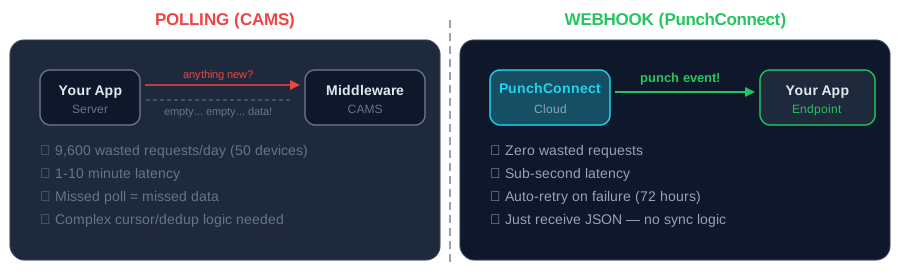
Most biometric middleware — including CAMS — uses a fetch/polling model. Your application asks *"anything new?"* every few seconds. Three problems get worse as you scale:
Latency. With a 5-minute polling interval, attendance events arrive 0-5 minutes late. For access control or shift handoffs, that's unacceptable.
Wasted requests. 200 employees across 3 shifts means the device is idle 16+ hours/day. Your app still polls every 5 minutes during idle hours — 192 empty requests per device per day. At 50 devices, that's 9,600 wasted API calls daily.
Sync complexity. Polling means you track cursors, handle duplicates, manage pagination, and recover from missed intervals. Over time, this becomes the most fragile part of your integration.
What Developers Actually Need
After talking to hundreds of integrators, three requirements come up every time:
1. Real Callback API (Webhooks)
When an employee punches, your server should know instantly — via an HTTP POST to your endpoint. You should never have to ask *"is there anything new?"*
PunchConnect uses standard HTTP webhooks — the same pattern used by Stripe, GitHub, and Twilio. You register a URL. PunchConnect sends POST requests to it. That's the entire integration.
2. Remote Device Control Without LAN
Push employees to devices, reboot terminals, sync time, configure settings — all from a REST API, anywhere in the world. No VPN, no static IP, no server on the same network.
# Add an employee to a remote devicecurl -X POST https://api.punchconnect.com/v1/employees/sync \-H "Authorization: Bearer YOUR_API_KEY" \-H "Content-Type: application/json" \-d '{"employees": [{"id": "1042", "name": "Sarah Chen"}]}'
3. Real-Time Sync Across Multiple Sites
When someone punches at Building A, your app should know in seconds — not after a batch sync runs 10 minutes later.
PunchConnect delivers attendance events via webhooks with sub-second latency:
{"event": "attendance.created","device_serial": "CZKE2234F0039","employee_id": "1042","timestamp": "2026-03-17T08:32:15Z","punch_type": "check_in","verification": "fingerprint"}
PunchConnect vs CAMS: Technical Comparison
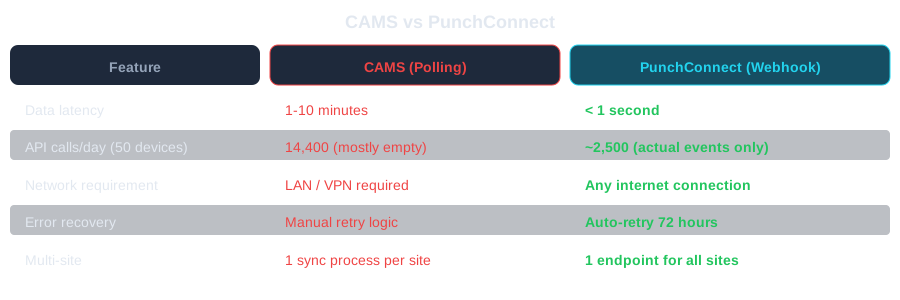
Data freshness. CAMS polling: 1-10 minutes behind real time. PunchConnect webhooks: under 1 second.
API calls/day. CAMS with 5-minute intervals on 20 devices: 5,760 requests/day. PunchConnect: only actual attendance events — typically 1,000-2,000 for 500 employees. 65-75% fewer API calls.
Error recovery. CAMS: missed poll = missed data, need retry logic. PunchConnect: failed webhooks auto-retry with exponential backoff for 72 hours.
Infrastructure. CAMS: persistent polling process + state database + monitoring. PunchConnect: one HTTP endpoint.
Multi-site. CAMS: may need per-site sync process. PunchConnect: all devices push to one cloud endpoint regardless of location.
Setting Up PunchConnect (5 Minutes)
That's it. Register this URL with PunchConnect, and every fingerprint scan across every device hits your endpoint in real time.
from flask import Flask, request, jsonifyapp = Flask(__name__)@app.route("/webhook/attendance", methods=["POST"])def handle_punch():event = request.jsonemployee_id = event["employee_id"]punch_type = event["punch_type"]timestamp = event["timestamp"]print(f"{punch_type}: Employee {employee_id} at {timestamp}")# Sync to your HR system herereturn jsonify({"received": True}), 200app.listen(5000)
Who's Switching — and Why
PunchConnect was built by the team behind AgriWise, where the same engine manages biometric devices for 24,000+ active employees across 50+ sites. The problem it solves isn't theoretical.
ERP vendors building attendance into Odoo or ERPNext need an API that works without LAN access.
System integrators managing 15 clients with 5-10 devices across different networks need a single control plane. Webhooks decouple data delivery from network topology.
Enterprise teams with compliance requirements need auditable, real-time event streams — not 5-minute polling gaps.
Pricing: No Surprises
$200 per device — one-time license. No monthly fees. No per-user charges. No per-API-call billing.
Volume discounts: $180 at 10+ devices (10% off), $160 at 25+ (20% off), custom at 50+.
Over 3 years, a single device costs $300 total ($200 + $50/yr renewal from Year 2).
Frequently Asked Questions
What makes PunchConnect different from CAMS? Real-time webhook delivery instead of polling, self-serve onboarding without manual activation, transparent pricing at $200/device, and a modern REST API with code samples in Python, JavaScript, and PHP.
Does PunchConnect support a real callback API? Yes. Standard HTTP webhooks — same pattern as Stripe, GitHub, Twilio. POST requests to your registered URL within milliseconds of a punch. No long-polling, no WebSockets, no persistent connections.
Can I use PunchConnect with non-ZKTeco devices? PunchConnect supports devices using the ZKTeco protocol family. Many manufacturers — eSSL, BioMax, Identix — produce compatible devices. Test during the 7-day free trial.
How does PunchConnect handle webhook failures? Automatic retry with exponential backoff for up to 72 hours. Every event includes a unique ID for deduplication. You can also query the REST API to backfill missed events.
Start Receiving Callbacks Today
Start your free 7-day trial — no credit card, no sales call. Configure your first device, register a webhook endpoint, and see attendance events flowing in under 5 minutes.
Questions? Check the API documentation or contact us.