Biometric Attendance Without Static IP: How Cloud APIs Eliminate Network Barriers
Biometric attendance without static IP is now possible using cloud REST APIs. Learn how PunchConnect eliminates port forwarding, VPNs, and static IP requirements for ZKTeco devices.
Why Static IPs Are the Biggest Barrier to Biometric Attendance
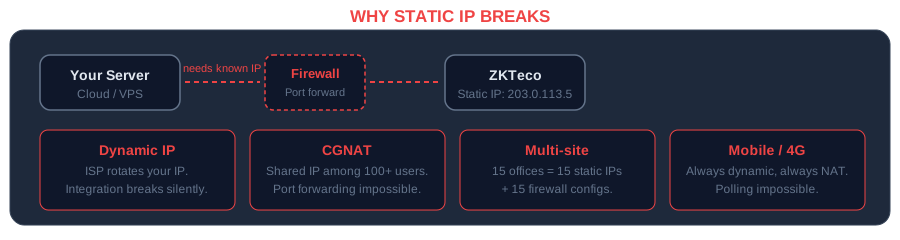
If you have ever tried to connect a ZKTeco biometric device to a cloud ERP, you have hit the same wall: the software requires a static IP address. Traditional biometric attendance systems rely on polling β a server reaches out to the device on a known IP address, pulls attendance logs, and syncs them to your HR system. This architecture demands that every device sits behind a static, publicly routable IP address with port forwarding configured on the router.
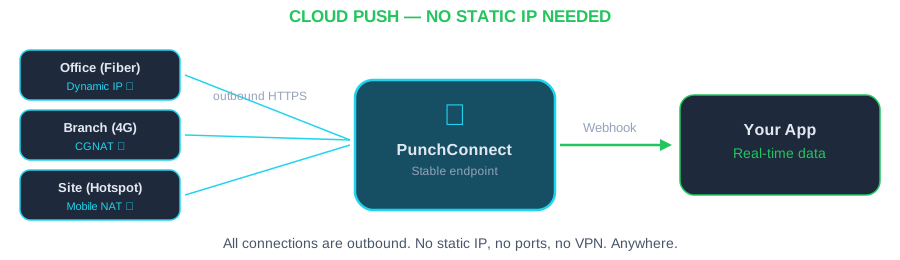
PunchConnect is a cloud REST API middleware that connects ZKTeco biometric devices to any software system. It eliminates the static IP requirement entirely. Instead of your server polling the device, the device pushes data to PunchConnect's cloud, and PunchConnect delivers it to your application via webhooks. No static IP. No port forwarding. No VPN tunnels.
For organizations running cloud-hosted ERPs like Odoo Online or ERPNext, this is not a minor convenience β it is the difference between a working integration and no integration at all.
The Static IP Problem: What Goes Wrong
The traditional polling model breaks in several real-world scenarios that affect thousands of deployments.
Dynamic ISP addresses. Most commercial internet connections in Africa, Southeast Asia, and Latin America use dynamic IP allocation. Your device's IP changes every time the router reboots or the ISP rotates addresses. Every IP change breaks your attendance sync.
NAT and carrier-grade NAT (CGNAT). Many ISPs place customers behind shared IP addresses. Even if you pay for a "static" plan, CGNAT means the public IP is shared among dozens of customers. Port forwarding simply does not work in this configuration.
Remote and multi-site deployments. A company with 15 branch offices needs 15 static IPs, 15 port-forwarding configurations, and 15 firewall rules to maintain. When one site changes ISP or moves office, the integration breaks until IT manually reconfigures everything.
Security policy conflicts. Opening inbound ports on a corporate firewall to allow a polling server to reach a biometric device is a security risk that many IT departments refuse to approve. Each open port is a potential attack surface.
Cloud ERP incompatibility. If your ERP runs on Odoo.sh, ERPNext cloud, or any SaaS platform, you have zero control over the server's network configuration. You cannot install local polling software or configure direct device connections. The biometric attendance for ERPNext integration path requires a cloud-native approach.
How Cloud-Based Biometric Attendance Eliminates Static IPs
The solution is to reverse the connection direction. Instead of your server reaching out to the device (which requires knowing its IP), the device reaches out to the cloud (which has a known, stable endpoint). This is fundamentally how PunchConnect works.
Step 1: Register your device in the PunchConnect dashboard. You enter your device's serial number and get a unique device identifier. No network configuration on the device side beyond pointing it to PunchConnect's cloud endpoint.
Step 2: Configure your webhook URL. Tell PunchConnect where to send attendance events. This is your application's endpoint β any URL that can receive HTTP POST requests.
Step 3: Receive real-time attendance data. When an employee punches in, the event flows from device β PunchConnect cloud β your webhook endpoint. The entire chain uses outbound connections only. No inbound ports need to be opened anywhere.
Here is what the webhook payload looks like when an attendance event arrives:
And here is how you register a webhook using the PunchConnect REST API:
```python
import requests
API_KEY = "your_api_key_here"
BASE_URL = "https://api.punchconnect.com/v1"
# Register a webhook for attendance events
response = requests.post(
f"{BASE_URL}/webhooks",
headers={"Authorization": f"Bearer {API_KEY}"},
json={
"url": "https://your-erp.com/api/attendance/webhook",
"events": ["attendance.created"],
"device_serial": "CZKE2234F0039"
}
)
print(response.json())
# {"id": "wh_abc123", "url": "https://your-erp.com/...", "status": "active"}
```
{
"event": "attendance",
"device_serial": "CZKE2234F0039",
"employee_id": "1042",
"timestamp": "2026-03-17T08:32:15Z",
"punch_type": "check_in",
"verification": "fingerprint"
}Biometric Attendance Without Static IP: The Architecture Compared
Understanding the difference between traditional polling and cloud-based push architecture clarifies why static IPs become irrelevant.
Traditional polling architecture:
Your Server (needs to know device IP) β Internet β Router (port forwarding required) β Device on LAN
Requirements: Static IP on device's network, port forwarding on router, firewall rules allowing inbound connections, polling interval (typically 5-15 minutes of latency).
Cloud push architecture (PunchConnect):
Device on LAN β Outbound HTTPS β PunchConnect Cloud β Webhook β Your Application
Requirements: The device needs internet access (outbound only). That is it. No static IP, no port forwarding, no VPN, no firewall changes. Events arrive in real time β not on a polling schedule.
This is the same model that powers every modern cloud service. Your phone does not need a static IP to receive push notifications. Your IoT sensors do not need static IPs to report data. Biometric devices should work the same way.
Setting Up ZKTeco Devices Without Static IP: Step by Step
Here is a concrete walkthrough for getting biometric attendance running without any static IP configuration.
Prerequisites: A ZKTeco device with firmware that supports cloud connectivity (most models manufactured after 2018), an internet connection at the device location, and a PunchConnect account (start a free 7-day trial β no credit card required).
1. Create your PunchConnect account and register the device.
2. Configure the device to connect to PunchConnect. Log into the PunchConnect dashboard, navigate to the device settings, and follow the on-screen instructions to configure your ZKTeco device's cloud connection. The dashboard provides device-specific setup steps β the entire process takes under 5 minutes.
3. Set up your webhook endpoint. Create an endpoint in your application that accepts POST requests. Here is a minimal example in Node.js:
```javascript
const express = require('express');
const app = express();
app.use(express.json());
app.post('/webhook/attendance', (req, res) => {
const { employee_id, timestamp, punch_type, device_serial } = req.body;
console.log(${punch_type}: Employee ${employee_id} at ${timestamp});
// Sync to your ERP/HRMS here
// Example: create attendance record in your database
syncToERP({
employeeId: employee_id,
checkTime: new Date(timestamp),
type: punch_type,
source: device_serial
});
res.status(200).json({ received: true });
});
app.listen(3000, () => console.log('Webhook listener running on port 3000'));
```
4. Register the webhook with PunchConnect. Point PunchConnect to your endpoint and specify which events you want to receive.
5. Test the integration. Place a finger on the device. Within seconds, your webhook endpoint receives the attendance event. No static IP involved at any point in the chain.
# Register a new device via API
curl -X POST https://api.punchconnect.com/v1/devices \
-H "Authorization: Bearer YOUR_API_KEY" \
-H "Content-Type: application/json" \
-d '{
"serial_number": "CZKE2234F0039",
"name": "Main Office Entrance",
"location": "Building A, Floor 1"
}'Real-World Scenarios Where Static IPs Fail
To understand why biometric attendance without static IP matters, consider these deployment scenarios that PunchConnect customers encounter regularly.
Scenario 1: Multi-branch retail chain. A retail company with 30 stores across a country. Each store has one or two ZKTeco devices. Store internet comes from various local ISPs β some with dynamic IPs, some behind CGNAT. With traditional polling, this company would need to manage 30 different network configurations, troubleshoot connectivity issues every time an ISP rotates addresses, and maintain a VPN infrastructure connecting all sites. With PunchConnect, each device connects outbound to the cloud. The central HR team receives all attendance data through a single webhook endpoint. Zero network configuration per site.
Scenario 2: Cloud Odoo deployment. A company runs Odoo on the cloud and cannot install local software. The traditional approach requires a middleware server with a static IP that both the devices and Odoo can reach β adding infrastructure cost and maintenance. PunchConnect eliminates this entirely. The device pushes to PunchConnect, and PunchConnect pushes to the Odoo instance via webhook. Read the full walkthrough in our guide on connecting ZKTeco to Odoo.
Scenario 3: Construction site with temporary connectivity. A construction company deploys biometric devices at project sites using 4G/LTE modems. Mobile connections always use dynamic IPs and often CGNAT. Polling-based systems are completely non-functional here. Push-based architecture works over any internet connection β WiFi, Ethernet, or cellular.
Comparing Approaches: VPN, Port Forwarding, and Cloud API
Before cloud APIs existed, teams used workarounds to deal with dynamic IPs. Here is how they compare.
VPN tunnels. Set up a VPN between each device location and your server. This works but adds complexity: you need a VPN server, client configuration at every site, and ongoing maintenance. VPN tunnels add latency, consume bandwidth, and create a single point of failure. If the VPN goes down, all attendance data stops flowing.
Dynamic DNS (DDNS). Register a DDNS hostname that updates when your IP changes. This partially solves the problem but introduces latency (DNS propagation delays), reliability issues (DDNS services go down), and still requires port forwarding on the router.
Reverse SSH tunnels. Create an outbound SSH tunnel from the device network to your server. Creative, but fragile. Tunnels break, need monitoring, and add operational overhead.
Cloud REST API (PunchConnect). No tunnels, no DNS tricks, no port forwarding. The device connects outbound. Your application receives webhooks. Both sides use standard HTTPS. This is the approach used by production systems handling real-time attendance for thousands of employees.
The per-device cost is $200 for a perpetual license with $50/year renewal starting in Year 2. Compare that to the operational cost of maintaining VPN infrastructure, troubleshooting port-forwarding issues, and dealing with downtime from IP changes. For a deeper comparison of cloud biometric platforms, see our CAMS biometrics alternative analysis.
Querying Attendance Data via REST API
Beyond receiving real-time webhooks, PunchConnect provides a REST API to query historical attendance data. This is useful for reconciliation, reporting, or backfilling missed events.
This REST endpoint does not require any special network configuration on the device side. The data is already in PunchConnect's cloud β you are simply querying it from your application.
import requests
API_KEY = "your_api_key_here"
BASE_URL = "https://api.punchconnect.com/v1"
# Get attendance records for a specific device and date range
response = requests.get(
f"{BASE_URL}/attendance",
headers={"Authorization": f"Bearer {API_KEY}"},
params={
"device_serial": "CZKE2234F0039",
"from": "2026-03-01T00:00:00Z",
"to": "2026-03-17T23:59:59Z",
"limit": 100
}
)
records = response.json()["data"]
print(f"Retrieved {len(records)} attendance records")
for record in records:
print(f" {record['employee_id']} - {record['timestamp']} - {record['punch_type']}")Frequently Asked Questions
Can I use biometric attendance without a static IP on ZKTeco devices?
Yes. PunchConnect uses a cloud-based push architecture where the ZKTeco device initiates an outbound connection to PunchConnect's cloud. Your device only needs standard internet access β no static IP, no port forwarding, and no VPN. This works with any ISP, including dynamic IP and CGNAT connections.
Does biometric attendance without static IP work with cloud-hosted ERPs like Odoo or ERPNext?
Absolutely. Since PunchConnect delivers attendance data via webhooks (HTTP POST to your endpoint), it works with any cloud-hosted ERP that can receive HTTP requests. There is no software to install on the ERP server. Odoo Online, Odoo.sh, ERPNext cloud, and custom SaaS platforms all work.
What happens if the device loses internet connectivity temporarily?
ZKTeco devices store attendance records locally in their internal memory (typically 50,000-100,000 records depending on the model). When connectivity is restored, the device syncs all stored events to PunchConnect's cloud. No data is lost during outages.
Is a cloud-based approach less secure than a direct LAN connection?
Cloud-based transmission uses AES-256 encryption and TLS 1.3 for all data in transit. PunchConnect's cloud runs with a 99.5% uptime SLA. In contrast, direct LAN polling often runs over unencrypted connections on internal networks. The cloud approach is typically more secure because it eliminates the need to open inbound firewall ports.
How many devices can I connect without static IPs through PunchConnect?
There is no limit. PunchConnect's production infrastructure currently handles deployments with 24,000+ employees across multiple sites. Each device connects independently to the cloud, so adding a new site requires zero network configuration beyond providing internet access. Pricing starts at $200/device with volume discounts for 10+ devices.
Get Started Without Static IP Headaches
Stop wrestling with port forwarding rules, VPN tunnels, and ISP configurations. PunchConnect gives you biometric attendance data through a clean REST API and real-time webhooks β no static IP required at any point in the chain.
Start your free 7-day trial β no credit card required. Register your first device in under 5 minutes and receive your first attendance webhook within seconds. Check the API documentation for complete endpoint references and code samples in Python, JavaScript, and cURL.