ZKTeco Webhook Integration: Real-Time Attendance Pipelines via REST API
Build real-time attendance pipelines with ZKTeco webhook integration. Replace polling with instant event delivery — step-by-step with Python, Node.js, and production patterns.
Why Polling ZKTeco Devices Is a Dead End
Every developer who integrates ZKTeco devices starts the same way: a cron job that polls the device every 10 minutes. It works on the bench. It breaks in production.
Three problems no amount of engineering can fix:
Latency. 10-minute polling = 0-10 minutes of stale data. For shift handoffs and overtime alerts, that's unacceptable.
Network dependency. Polling requires your server to reach the device at a known IP. Cloud-hosted apps need VPNs, static IPs, or port forwarding. See our guide on biometric attendance without static IP for why that's a dead end.
Fragility at scale. 50 devices × 12 offices = 50 potential points of failure. One ISP outage and attendance data disappears with no notification.
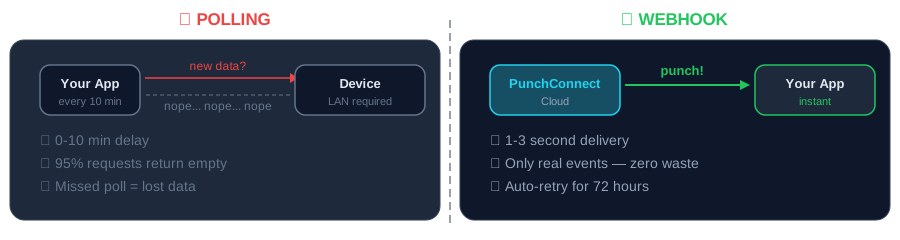
How ZKTeco Webhook Integration Works
Webhooks reverse the connection. Instead of your app asking *"any new punches?"*, PunchConnect tells your app the instant a punch happens.
1. Employee scans fingerprint on ZKTeco device.
2. Device sends event to PunchConnect cloud (configured once in dashboard).
3. PunchConnect normalizes the data and sends HTTP POST to your webhook URL.
4. Your app processes the event and responds 200 OK.
Your app exposes one HTTPS endpoint. That's the entire infrastructure requirement. No polling loops, no TCP sockets, no device protocol knowledge.
Step 1: Register a Webhook
Events you can subscribe to:
- attendance.created — punch in/out event
- device.online — device connected to cloud
- device.offline — device stopped responding
- employee.enrolled — new biometric template registered
curl -X POST https://api.punchconnect.com/v1/webhooks \-H "Authorization: Bearer YOUR_API_KEY" \-H "Content-Type: application/json" \-d '{"url": "https://your-app.com/webhooks/attendance","events": ["attendance.created", "device.online", "device.offline"],"secret": "whsec_your_signing_secret"}'
Step 2: Build a Webhook Receiver (Python)
import hmac, hashlibfrom flask import Flask, request, jsonifyapp = Flask(__name__)SECRET = "whsec_your_signing_secret"@app.route("/webhooks/attendance", methods=["POST"])def handle():sig = request.headers.get("X-PunchConnect-Signature", "")expected = hmac.new(SECRET.encode(), request.data, hashlib.sha256).hexdigest()if not hmac.compare_digest(f"sha256={expected}", sig):return jsonify({"error": "Invalid signature"}), 401event = request.jsonif event.get("event") == "attendance.created":print(f"{event['punch_type']}: Employee {event['employee_id']} at {event['timestamp']}")elif event.get("event") == "device.offline":print(f"ALERT: Device {event['device_serial']} offline!")return jsonify({"received": True}), 200
Step 3: Build a Webhook Receiver (Node.js)
const express = require("express");const crypto = require("crypto");const app = express();app.use(express.json({ verify: (req, res, buf) => { req.rawBody = buf; } }));app.post("/webhooks/attendance", (req, res) => {const sig = req.headers["x-punchconnect-signature"] || "";const expected = crypto.createHmac("sha256", "whsec_your_secret").update(req.rawBody).digest("hex");if (!crypto.timingSafeEqual(Buffer.from(`sha256=${expected}`), Buffer.from(sig)))return res.status(401).json({ error: "Invalid signature" });const { event, employee_id, timestamp, punch_type } = req.body;if (event === "attendance.created")console.log(`${punch_type}: ${employee_id} at ${timestamp}`);res.status(200).json({ received: true });});app.listen(5000);
Production Patterns
Idempotency
Network issues can cause retries. Every event has a unique event_id. Track processed IDs:
processed = set() # Use Redis in productiondef handle_event(event):if event["event_id"] in processed:return # Skip duplicateprocessed.add(event["event_id"])# Process...
Retry Policy
PunchConnect retries failed deliveries with exponential backoff: 1 min → 5 min → 30 min → 2 hours → 24 hours. After 5 failures, you get an email alert. Your endpoint should respond within 10 seconds — offload heavy processing to a queue.
Multi-Site Routing
Route events by device to the correct pipeline:
SITES = {"CZKE2234F0039": "warehouse_a","CZKE2234F0041": "headquarters","CZKE2234F0055": "branch_nairobi",}def process(event):site = SITES.get(event["device_serial"], "unknown")sync_to_erp(site, event)
Connecting to Your ERP
Webhooks shine when connected to your existing systems:
- Odoo — forward webhook events to Odoo's XML-RPC API
- ERPNext — create Employee Checkin records via Frappe API
- Custom systems — any stack that handles HTTP POST: Django, Laravel, Spring Boot, serverless functions
Scale
PunchConnect handles 24,000+ active employees across 50+ sites in production. Same API for 1 device or 100 devices. Read the AgriWise case study →
Pricing
$200 per device — one-time license. Unlimited webhook deliveries included. No per-event billing.
Frequently Asked Questions
How fast does a ZKTeco webhook deliver attendance data? 1-3 seconds from fingerprint scan to your webhook endpoint.
Do I need a static IP for ZKTeco webhook integration? No. The device connects outbound to PunchConnect's cloud. Your webhook endpoint just needs to be reachable via HTTPS. See our static IP guide.
Can I receive webhooks from multiple devices on one endpoint? Yes. Each payload includes device_serial so you can route by device. Organizations with 50+ devices commonly use one endpoint with internal routing.
What if my endpoint is temporarily down? PunchConnect retries with exponential backoff for 24 hours. No data is lost. You can also backfill via the REST API.
Does it work with Odoo Online and cloud ERPs? Yes. Webhooks are standard HTTP POST — compatible with any system that exposes an HTTPS endpoint.
Start Building
Start your free 7-day trial — no credit card. Register a device, create a webhook, receive your first real-time event in under 5 minutes. No SDK, no protocol docs, no static IP.