Biometric Device REST API: The Complete Developer Guide
Connect ZKTeco biometric devices to any software using a cloud REST API. Complete guide with authentication patterns, real-time webhooks, and production-ready code in Python, JavaScript, and cURL.
Introduction
Your ERP runs in the cloud. Your biometric devices sit in office lobbies. Connecting the two shouldn't require a networking degree.
Vendor SDKs demand local network access, C++ knowledge, and a specific OS. Direct device protocols are undocumented and fragile. Database polling introduces delays and maintenance headaches. Every traditional method assumes your software lives on the same LAN as the device. In 2026, it usually doesn't.
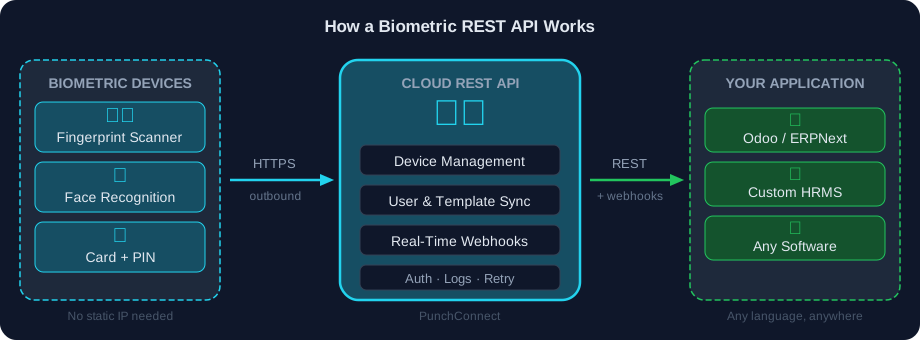
A biometric device REST API solves this. It's a cloud middleware layer that sits between your devices and your application, exposing standard HTTP endpoints for device management, user enrollment, and real-time attendance data via webhooks.
PunchConnect is exactly that — a production-proven cloud REST API that connects ZKTeco biometric devices to any software system. 24,000+ active employees across 50+ sites run on it today. This guide shows you how biometric REST APIs work, how to integrate one, and how to handle authentication, webhooks, and error recovery in production.
Why REST APIs Beat Every Other Integration Method
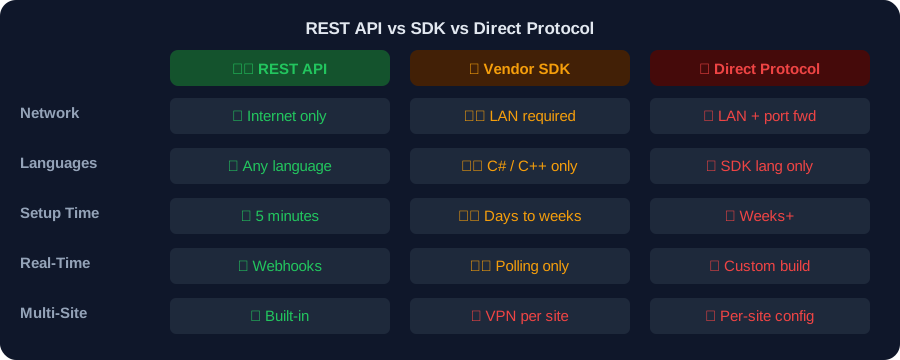
If you've researched biometric device integration, you've probably found three paths: vendor SDKs, direct protocol access, and REST APIs. Here's why experienced teams choose REST.
SDKs lock you in. ZKTeco's official SDK is a Windows DLL that speaks C#. If your backend is Python on Linux — or your ERP is cloud-hosted — you're stuck. Libraries like node-zklib try to reverse-engineer the protocol, but they break on firmware updates and can't scale beyond a handful of devices.
Direct protocols need LAN access. Every SDK and protocol library requires TCP port 4370 on the device's local network. That means VPN tunnels, static IPs, and firewall rules — per site. One ISP change breaks your setup.
REST APIs just work. Standard HTTPS. Any programming language. No local installation. The device connects outbound (like a phone connecting to the internet), and your application makes HTTP requests to a cloud endpoint.
What a Good Biometric REST API Provides
1. Device management — Register, configure, monitor, and decommission devices remotely
2. User enrollment — Add users with biometric templates (fingerprint, face, palm) without physical presence
3. Real-time attendance — Webhooks deliver punch events instantly; no polling required
4. Event handling — Door access, security alerts, device status changes
5. Multi-site support — Manage devices across 50+ locations from a single API key
Core API Endpoints: What You'll Actually Use
A well-designed biometric REST API organizes around three resources: devices, users, and attendance logs. Here's what the requests look like.
Device Management
# Register a new devicePOST /v1/devices{"serial_number": "AKJD193840129","name": "Main Office Entrance","location": "Building A, Floor 1"}# Check device statusGET /v1/devices/AKJD193840129# → { "status": "online", "users": 243, "logs": 15847, "storage": "34%" }# Remove a deviceDELETE /v1/devices/AKJD193840129
User Enrollment
# Add user with fingerprint templatePOST /v1/users{"device_id": "AKJD193840129","user_id": "EMP_001","name": "John Doe","templates": [{"type": "fingerprint","data": "BASE64_ENCODED_TEMPLATE","index": 0}]}# Update user infoPUT /v1/users/EMP_001{ "name": "John A. Doe", "department": "Engineering" }# Remove user from deviceDELETE /v1/users/EMP_001?device_id=AKJD193840129
Attendance Logs
Real-time events arrive via webhooks (covered below). The GET /logs endpoint is your backup for missed events or historical queries.
# Fetch historical logsGET /v1/logs?start_date=2026-03-01&end_date=2026-03-27&user_id=EMP_001
Production Code: Fetch Attendance Logs
cURL:
Python:
```python
import requests
API_KEY = "your_api_key_here"
BASE_URL = "https://api.punchconnect.com/v1"
response = requests.get(
f"{BASE_URL}/logs",
headers={"Authorization": f"Bearer {API_KEY}"},
params={
"start_date": "2026-03-01",
"end_date": "2026-03-27",
"user_id": "EMP_001"
}
)
for log in response.json()["data"]:
print(f"{log['user_id']} — {log['punch_type']} at {log['timestamp']}")
```
JavaScript:
```javascript
const API_KEY = 'your_api_key_here';
const res = await fetch(
'https://api.punchconnect.com/v1/logs?start_date=2026-03-01&end_date=2026-03-27',
{ headers: { Authorization: Bearer ${API_KEY} } }
);
const { data } = await res.json();
data.forEach(log =>
console.log(${log.user_id} — ${log.punch_type} at ${log.timestamp})
);
```
curl -X GET "https://api.punchconnect.com/v1/logs?start_date=2026-03-01&end_date=2026-03-27" \-H "Authorization: Bearer YOUR_API_KEY"
Authentication: Three Patterns You Need to Know
Biometric data is sensitive. Wrong authentication means unauthorized device control or leaked employee records. Here are the three patterns used in production.
1. API Keys — Server-to-Server (Recommended)
The simplest method. Include your key in every request header:
Best for: Backend services, cron jobs, ERP integrations. PunchConnect uses this pattern.
Rules: Store in environment variables. Never commit to git. Rotate quarterly. Use separate keys for dev, staging, and production.
Authorization: Bearer sk_live_abc123def456
2. OAuth 2.0 — User-Facing Apps
Delegated access with short-lived tokens. Users authorize your app to access their biometric data without sharing credentials.
Best for: SaaS products where end-users own the devices. More complex to implement — only use if you're building a multi-tenant platform.
3. HMAC Signatures — Webhook Verification
When the API sends webhooks to your server, HMAC signatures prove the request is legitimate:
import hmac, hashlibdef verify_webhook(payload: str, signature: str, secret: str) -> bool:"""Verify HMAC-SHA256 signature on incoming webhook."""expected = hmac.new(key=secret.encode(),msg=payload.encode(),digestmod=hashlib.sha256).hexdigest()return hmac.compare_digest(expected, signature)# In your webhook handler:if not verify_webhook(request.body, request.headers['X-Signature'], WEBHOOK_SECRET):return {"error": "Invalid signature"}, 401
Authentication Best Practices
- Always HTTPS — TLS 1.3 encrypts API keys in transit
- Rotate keys quarterly — or immediately if compromised
- Environment variables only — never hardcode in source
- Separate keys per environment — dev, staging, production
- Monitor usage — flag unusual patterns (high volume, unexpected IPs)
Real-Time Webhooks: How Attendance Events Flow
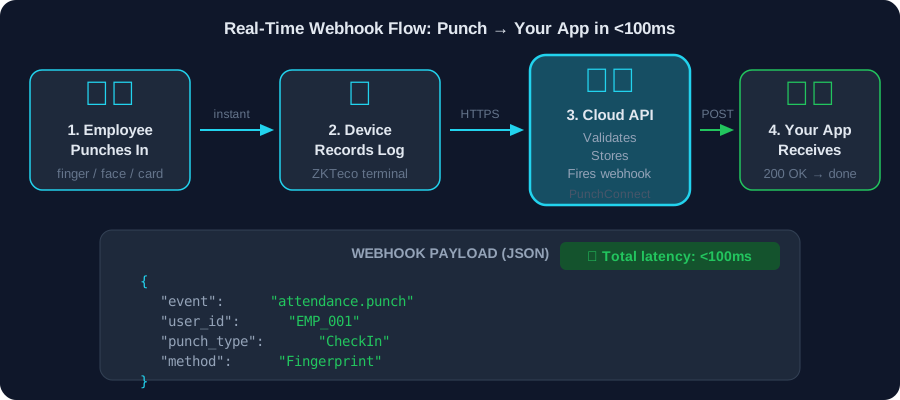
Webhooks eliminate polling entirely. The moment someone punches in, your server knows. Here's the full flow.
The Flow
1. Employee scans — finger, face, or card on the biometric device
2. Device sends event — outbound HTTPS to the cloud gateway (automatic, no config)
3. Cloud processes — validates, stores, and fires an HTTP POST to your webhook URL
4. Your server receives JSON — process, store, respond 200 OK
Webhook Payload Structure
Critical fields:
- `event_id` — Store this for idempotency (duplicate detection)
- `punch.type` — CheckIn, CheckOut, BreakIn, BreakOut
- `punch.method` — Fingerprint, Face, Card, Palm, Password
- `timestamp` — Always UTC; convert to local timezone for display
- `temperature` / `mask_detected` — Optional; present if device supports thermal/mask scanning
{"event": "attendance.punch","event_id": "evt_1a2b3c4d5e","timestamp": "2026-03-27T08:30:12Z","device": {"id": "DEVICE_12345","name": "Main Office Entrance","location": "Building A"},"user": {"id": "EMP_001","name": "John Doe"},"punch": {"type": "CheckIn","method": "Fingerprint","timestamp": "2026-03-27T08:30:12Z","temperature": 36.5,"mask_detected": false}}
Production Webhook Handler (Node.js)
const express = require('express');const crypto = require('crypto');const app = express();app.use(express.json());function verifySignature(payload, signature) {const expected = crypto.createHmac('sha256', process.env.WEBHOOK_SECRET).update(JSON.stringify(payload)).digest('hex');return crypto.timingSafeEqual(Buffer.from(expected), Buffer.from(signature));}app.post('/webhooks/attendance', async (req, res) => {// 1. Verify signatureif (!verifySignature(req.body, req.headers['x-signature'])) {return res.status(401).json({ error: 'Invalid signature' });}const { event_id, user, punch, device } = req.body;// 2. Idempotency check — skip duplicatesconst exists = await db.query('SELECT 1 FROM processed_events WHERE event_id = ?', [event_id]);if (exists.length > 0) {return res.status(200).json({ status: 'already_processed' });}// 3. Store attendance recordawait db.query(`INSERT INTO attendance (employee_id, punch_type, punch_time, device_id)VALUES (?, ?, ?, ?)`,[user.id, punch.type, punch.timestamp, device.id]);// 4. Mark processedawait db.query('INSERT INTO processed_events (event_id) VALUES (?)', [event_id]);// 5. Acknowledgeres.status(200).json({ status: 'received' });});app.listen(3000);
What Happens When Your Server Is Down?
PunchConnect retries failed webhooks with exponential backoff for up to 24 hours:
- Attempt 1: immediate
- Attempt 2: +1 second
- Attempt 3: +2 seconds
- Attempt 4: +4 seconds
- …continues doubling
Once your server recovers, all missed events arrive automatically. The webhook logs dashboard lets you manually resend specific events if needed.
Why idempotency matters: If retry #2 succeeds but PunchConnect doesn't receive your 200 OK (network blip), retry #3 sends the same event. Use event_id to detect and skip duplicates. Always.
Remote User Enrollment: Add Employees Without Physical Presence
Traditional enrollment requires each employee to physically visit the device and scan their fingerprint multiple times. With a REST API, you can enroll users from anywhere.
How It Works
1. Capture template at a central enrollment station using a USB fingerprint scanner
2. Encode as base64 — standard binary-to-text conversion
3. POST to the API — the cloud pushes the template to the device
4. Employee is enrolled — no travel required, no physical presence at the device
Python Example: Remote Fingerprint Enrollment
import requests, base64API_KEY = "your_api_key_here"BASE_URL = "https://api.punchconnect.com/v1"# Capture from local scanner (your scanner SDK provides raw bytes)fingerprint_bytes = capture_fingerprint_from_scanner()template_b64 = base64.b64encode(fingerprint_bytes).decode('utf-8')response = requests.post(f"{BASE_URL}/users",headers={"Authorization": f"Bearer {API_KEY}","Content-Type": "application/json"},json={"device_id": "DEVICE_12345","user_id": "EMP_001","name": "John Doe","department": "Engineering","templates": [{"type": "fingerprint", "data": template_b64, "index": 0},{"type": "fingerprint", "data": capture_backup_finger(), "index": 1}]})if response.status_code == 201:print(f"✅ User {response.json()['user_id']} enrolled")else:print(f"❌ Error: {response.json()['error']}")
Proven at Scale
This is exactly how AgriWise manages 24,000+ employees across distributed agricultural sites. HR staff enroll workers at central offices, and templates sync to remote devices within seconds. No one travels to a farm to stand in front of a scanner. Learn more about setting up real-time webhooks for instant data delivery.
Template Format Note
Biometric templates are vendor-specific. ZKTeco uses its proprietary format; other manufacturers use different formats. For maximum portability, look for APIs that support ISO 19794-2 standard templates. PunchConnect handles format translation automatically for supported ZKTeco models.
Error Handling and Rate Limits
Production integrations need graceful error recovery. Here's what to expect and how to handle it.
HTTP Status Codes You'll See
| Code | Meaning | Action |
|------|---------|--------|
| 200 | Success | Process response |
| 201 | Created (user added, device registered) | Store new ID |
| 400 | Bad request (missing field, wrong format) | Fix payload, retry |
| 401 | Invalid API key | Check key, regenerate |
| 429 | Rate limited | Wait, retry with backoff |
| 500 | Server error | Retry with backoff |
Retry Logic with Exponential Backoff
import requests, timedef api_request(url, headers, json_data, max_retries=5):"""API request with exponential backoff."""for attempt in range(max_retries):try:response = requests.post(url, headers=headers, json=json_data, timeout=10)if response.status_code in (200, 201):return response.json()if response.status_code in (429, 500, 502, 503):wait = 2 ** attempt # 1s, 2s, 4s, 8s, 16sprint(f"Retrying in {wait}s (HTTP {response.status_code})...")time.sleep(wait)continueresponse.raise_for_status() # 400, 401, 403 — don't retryexcept requests.exceptions.Timeout:time.sleep(2 ** attempt)raise Exception(f"Failed after {max_retries} attempts")
Batch Operations to Stay Under Rate Limits
Most REST APIs enforce 100 requests/minute per API key. Instead of enrolling 50 users one-by-one, use batch endpoints:
One request instead of 50. Stay well under limits.
POST /v1/users/batch{"device_id": "DEVICE_12345","users": [{ "user_id": "EMP_001", "name": "John Doe", "templates": [...] },{ "user_id": "EMP_002", "name": "Jane Smith", "templates": [...] }]}
FAQ
Do I need a static IP to use a biometric device REST API?
No. Cloud REST APIs eliminate static IP requirements entirely. The biometric device connects outbound to the cloud gateway over standard HTTPS (port 443). Your application receives data via webhooks. No port forwarding, no VPN, no firewall exceptions on the device side. This is one of the biggest advantages over SDK integrations that require LAN access.
Can I use a REST API with any biometric device brand?
It depends on the provider. Some APIs only support their own hardware. PunchConnect supports ZKTeco devices and compatible manufacturers — over 200 device models. Always verify device compatibility before committing. If you're using Odoo for HR or ERPNext, REST APIs integrate without VPNs or local software.
What's the difference between a REST API and an SDK for biometric integration?
SDKs are libraries you install locally that communicate directly with devices over LAN. They're platform-specific (Windows DLLs, Linux .so files), require C++ or C#, and only work within the local network. REST APIs are cloud HTTP endpoints that work from any language, anywhere, without local installation. REST APIs handle network complexity, provide real-time webhooks, and are the only option for cloud-hosted ERP systems like Odoo Online or cloud ERPNext.
How do I secure my webhook endpoint?
Five practices: (1) Verify HMAC-SHA256 signatures on every request (see code above). (2) HTTPS only — never plain HTTP. (3) Allowlist the API provider's IP ranges in your firewall. (4) Rate-limit your endpoint to prevent abuse. (5) Store event_id values for idempotency — reject duplicates.
What happens if my webhook endpoint goes down?
PunchConnect retries failed webhooks for up to 24 hours with exponential backoff. Once your server recovers, missed events arrive automatically. For longer outages, use GET /v1/logs to backfill. Always implement idempotency checks to handle duplicate deliveries when retries succeed after recovery.
How does remote user enrollment work?
Capture fingerprint templates at a central enrollment station, encode as base64, and POST to the API. The cloud pushes templates to the target device. No physical presence required at the device location. PunchConnect powers this for 24,000+ employees on AgriWise across distributed sites.
Start Building
Biometric device REST APIs eliminate SDK complexity, static IP requirements, and polling delays. Standard HTTP requests in, real-time webhook events out. Any language, any platform, any location.
Why teams choose PunchConnect:
- Production-proven — 24,000+ employees on AgriWise across 50+ sites
- 5-minute setup — Register device, get API key, receive real-time data
- <100ms webhook latency — with automatic retry for 24 hours
- No static IP — devices connect outbound; zero network configuration
- $200/device one-time, $50/year renewal — transparent, no hidden fees
Start your 7-day free trial → No credit card. Connect your first device in under 5 minutes.